Development Newsletters
Release: 18-11-2026
List of new features and major fixes for this release:
Creative template search and filtering
We have added a search bar and advanced filtering options to the creative template list. You will be able to search by template name and filter the list by:
- Scope: custom or global.
- Status: active or inactive.
- Template flags: viewability support, support for political ads, violation of the Better Ads Agreement, support for video statistics, and iframe support.

Template version information and column selection in the Creatives list
We are preparing to introduce template versioning, which will allow you to update custom templates. As a first step, the Creatives list and individual creative views will show the assigned template’s version number and whether it is current or outdated.
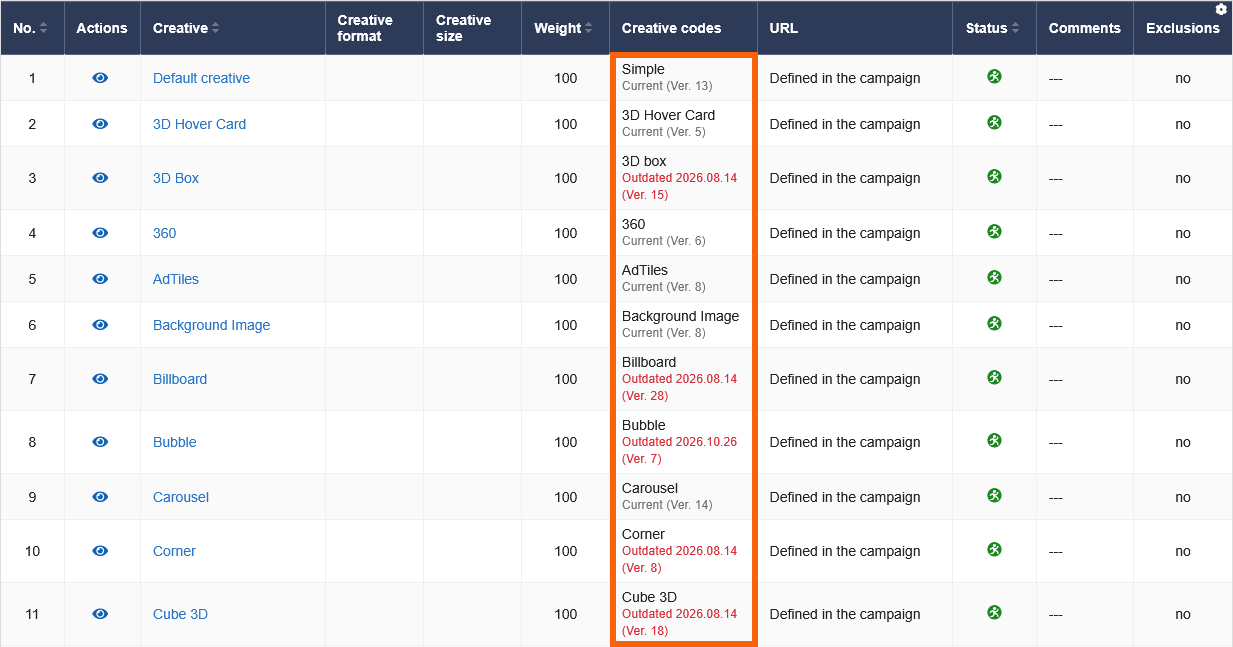
You will also be able to choose which columns are displayed in the Creatives list, adjusting the table to show the information you need. Additionally, improving alignment and text wrapping in tables, particularly in the orders and creative lists.
Choose Monday or Sunday as the first day of the week in calendars
A new option in general interface preferences will let you choose Monday or Sunday as the first day of the week in calendars.

API updates
The following fields will be added to API responses:
GetCreativeTemplatesList: a newtemplatesNumberfield indicating the number of templates matching the applied filters.-
GetAssignedCreativesList,GetCreativeInfo, andGetCreativesList: two new fields:templateVersion: the version number of the template assigned to the creative.templateVersionDeactivationDate: the date when the template version used by the creative was superseded by a newer version in AdOcean, orNULLif it is still the current version.
api Creatives list global creative templates preferences table template versioning