Development Newsletters
Release: 18-02-2026
List of new features and major fixes for this release:
DSA Political Advertising Regulation update
The EU Regulation on the transparency and targeting of political advertising introduces enhanced transparency obligations for political advertising. The regulation requires clearer disclosure of political ad sponsors, targeting parameters, and funding information. As a result, updates to AdOcean interface are being implemented (along with related API changes of which details can be found in the following section) to provide users with possibility to clearly identify political advertisements and ensure compliance with regulatory requirements.
There's a new tab in campaign's settings called Political Advertising - it contains new fields related to Political Advertising Regulation, which are mandatory when defining a political campaign:
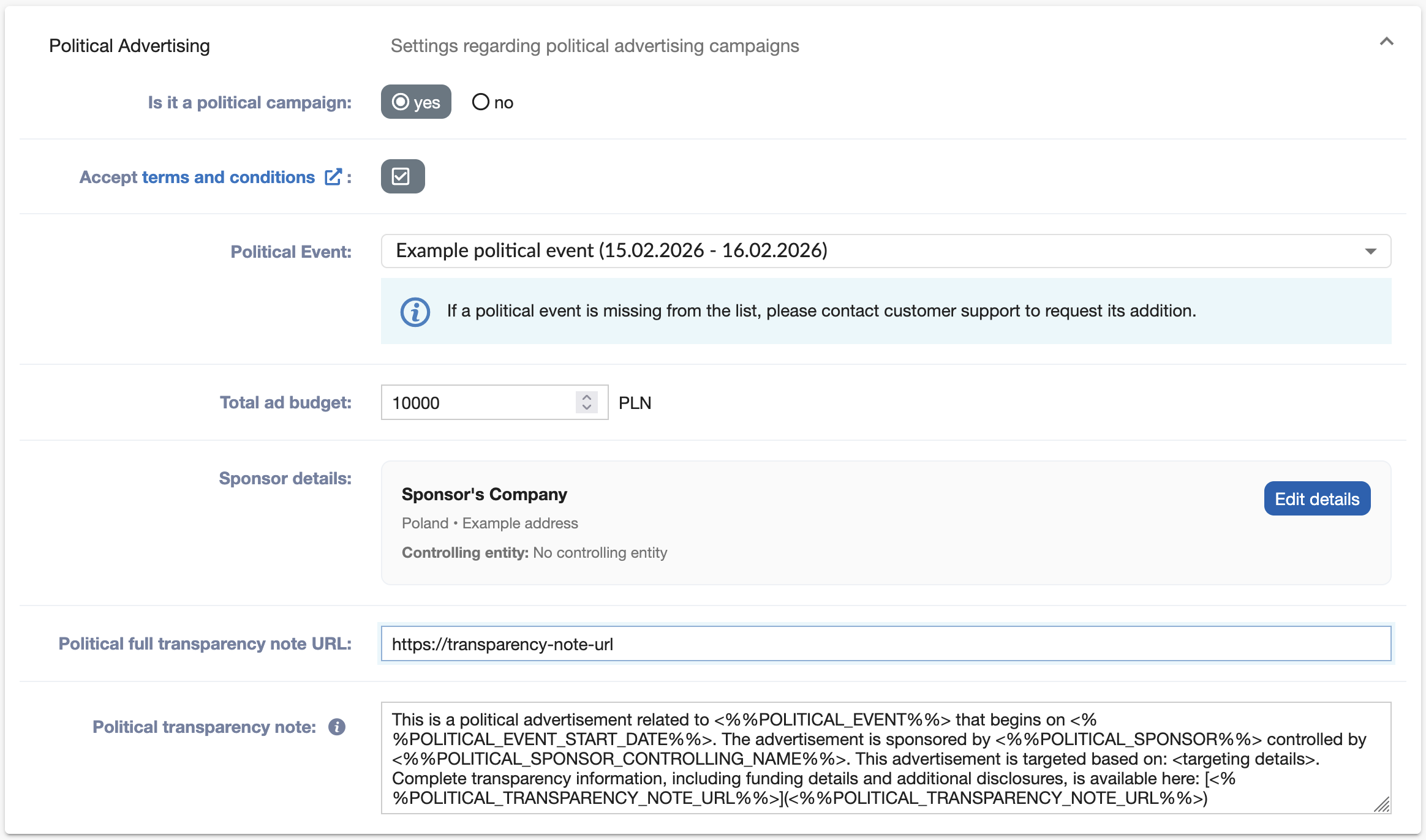
- Is it a political campaign - allows the user to mark a campaign as political.
- Accept terms and conditions - terms and conditions of political advertising campaigns in AdOcean.
- Political Event - a drop-down list enabling the selection of the political event to which the campaign relates.
- Total ad budget - the total budget allocated to the campaign.
- Sponsor details - details about sponsor of the given campaign (described below).
- Political full transparency note URL - URL to full transparency note containing all required details about political campaign.
- Political transparency note - a disclosure note displayed with the advertisement. Information provided in this field becomes available via a dedicated button at the advertisement level.
Sponsor details section contains:
- Sponsor's name - the name of the entity sponsoring the campaign.
- Sponsor's address - the address of sponsoring entity.
- Sponsor's country - the country in which the sponsoring entity is registered.
- Set sponsor's controlling entity - defines whether the sponsor is controlled by another entity.
- Sponsor's controlling entity name - the name of entity that controls the sponsor.
- Sponsor's controlling entity country - the country of entity that controls the sponsor.
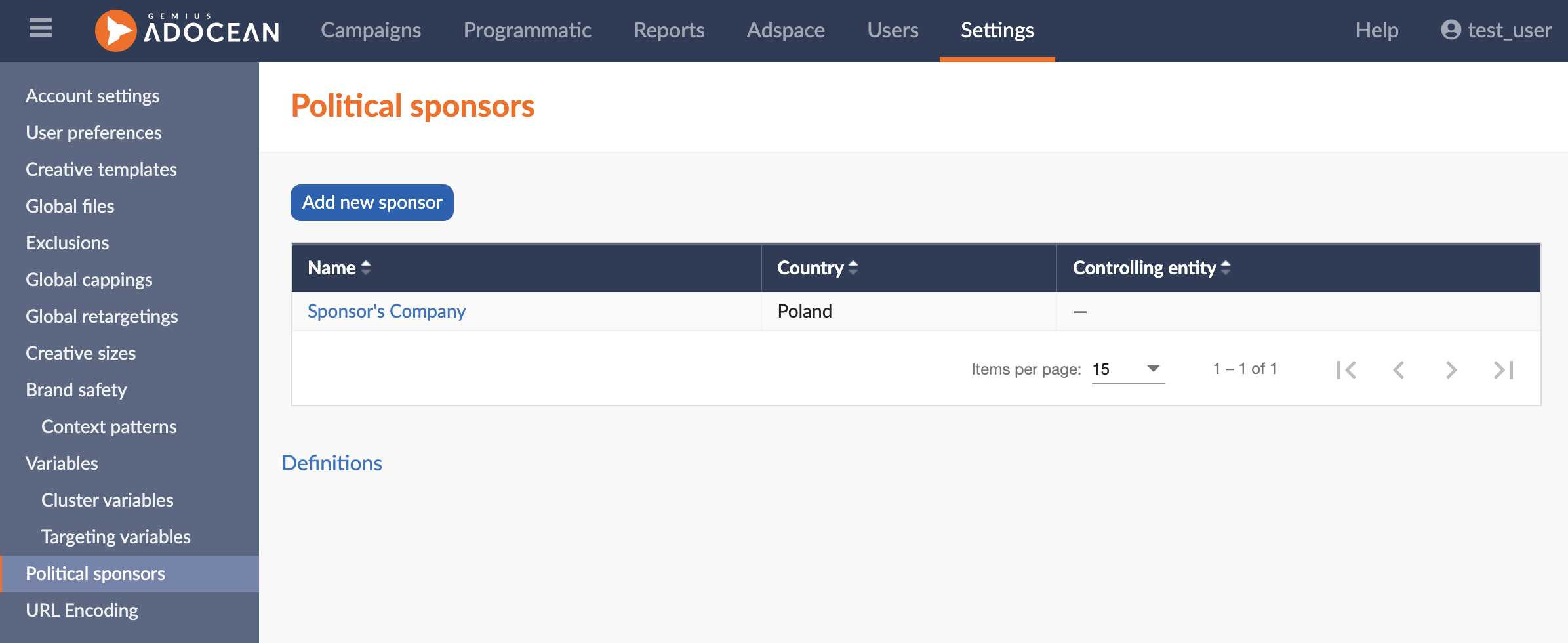
You are able to predefine sponsors in separate section of Settings called Political sponsors:
Default political transparency note can be changed in Legal section of Account settings:

As a result of introducing the above fields, new macros are now available:
- <%%POLITICAL_SPONSOR%%>
- <%%POLITICAL_SPONSOR_ADDRESS%%>
- <%%POLITICAL_SPONSOR_COUNTRY%%>
- <%%POLITICAL_SPONSOR_CONTROLLING_NAME%%>
- <%%POLITICAL_SPONSOR_CONTROLLING_COUNTRY%%>
- <%%POLITICAL_BUDGET%%>
- <%%POLITICAL_EVENT%%>
- <%%POLITICAL_EVENT_START_DATE%%>
- <%%POLITICAL_EVENT_END_DATE%%>
- <%%POLITICAL_TRANSPARENCY_NOTE_URL%%>
The introduction of all these changes also require updates at the creative template level. To get you started, we are providing the following list of templates available for political campaigns:
- 360
- 3D Hover Card
- 3D Box
- AdTiles
- Billboard
- Carousel
- Cube 3D
- Curtain
- Dynamic reveal
- In article video
- Interscroller
- Masthead video
- Media Room
- Multi-rotation cuboid
- Multimedia AdTiles
- Parallax
- Responsive Footer Billboard
- Swipe
- Viewable billboard
- Vewable sticky ad
- VPAID Linear
API changes
The API changes described below are related to the release outlined in the previous section.
New commands:
- GetPoliticalEventsList - returns a list of political events.
- GetPoliticalCampaignData - returns information about political campaign.
- SetPoliticalCampaignData - allows to set the details about political campaign.
Modifications to already existing commands:
- AddCreative - new parameter politicalTransparencyNote.
- UpdateCreative - new parameter politicalTransparencyNote.
- GetCreativeInfo - new parameter politicalTransparencyNote.
Note: politicalTransparencyNote field allows the user to modify the transparency note for the creative, overriding the value defined in SetPoliticalCampaignData command.
Update to campaign end date editing
To ensure stable and predictable performance of long-running campaigns, we are introducing a small but important update to how campaign end dates can be modified in AdOcean.
Starting from February 18, it will not be possible to change the end date (endTS) of a campaign when both of the following criteria apply:
- The campaign has already finished, and
- The campaign has been running for more than one year.
The campaign end date can still be modified if the campaign has been running for more than one year as long as it is still active and has not yet ended.
This update helps us:
- maintain system stability
- ensure consistent performance for all users